
Exploring Container Security Tools
Trivy
Trivy is an open-source container security tool, developed by Aqua Security. It can be used to analyze container images for known vulnerabilities. It can als...
Trivy is an open-source container security tool, developed by Aqua Security. It can be used to analyze container images for known vulnerabilities. It can also scan misconfigurations, secrets, and licenses. It supports many OS package managers and programming languages, including Alpine Linux, Debian, Red Hat, Ubuntu, Python, Ruby, and Java.
Trivy is available as a Docker image, and can be used to analyze container images without installing it on the host operating system. It can also be installed on the host operating system, and used to analyze the host operating system itself.
At KubeCon 2024 in Paris, I had the pleasure of chatting with the Aqua Security folks about this very chapter. They were genuinely excited, gifted me a special T-shirt, and we took a photo together.
Analyzing Container Images
To check a Docker image, say alpine:3.12, for known vulnerabilities, run the following command:
docker run --rm -it aquasec/trivy image alpine:3.12
The output of the command will be similar to the following:
alpine:3.12 (alpine 3.12.12)

Total: 1 (UNKNOWN: 0, LOW: 0, MEDIUM: 0, HIGH: 0, CRITICAL: 1)
And then the following table will be shown:
| Library | Vulnerability | Severity | Status | Installed | Fixed |
|---|---|---|---|---|---|
| zlib | CVE-2022-37434 | critical | fixed | 1.2.12-r0 | 1.2.12-r2 |
Table: Trivy scan results for the alpine:3.12 image
The following explanation is also given:
Heap-based buffer over-read and overflow in
inflate()ininflate.cvia a large input
The output of the command shows that the image has one critical vulnerability, in the zlib library. The
vulnerability is described in the following CVE: CVE-2022-37434.
There is a link to Aqua Security's vulnerability database provided, which is used by Trivy to detect vulnerabilities.
The output also shows that the image is based on Alpine Linux 3.12.12, which is no longer supported by the distribution. This means that the image is not receiving security updates, and may be vulnerable to other unpatched vulnerabilities.
This output format is called the table format, and is the default output format of Trivy.
Let’s scan the latest Alpine image (3.21.3 at the time of writing):
docker run --rm -it aquasec/trivy image alpine:latest
The output of the command will be similar to the following:
alpine:latest (alpine 3.21.3)

Total: 0 (UNKNOWN: 0, LOW: 0, MEDIUM: 0, HIGH: 0, CRITICAL: 0)
The scan shows no known vulnerabilities, as Alpine Linux is actively maintained and regularly receives security updates.
Now let’s scan the latest Debian image (12.9 at the time of writing):
docker run --rm -it aquasec/trivy image debian:latest
The output of the command will be similar to the following:
debian:latest (debian 12.9)

Total: 76 (UNKNOWN: 0, LOW: 57, MEDIUM: 17, HIGH: 1, CRITICAL: 1)
It shows that the image has 76 known vulnerabilities, 57 of which are low severity, 17 are medium severity, 1 is high severity, and 1 is critical. This is because Debian is a general-purpose operating system, and far more packages are installed by default, compared to Alpine Linux.
Container Image Scan Output Formats
The table output in the previous section is human-readable (at least for humans), but not easily machine-readable. To address this, Trivy supports output formats like JSON, SARIF, and CycloneDX, which allow integration with tools and pipelines that consume scan data programmatically.
- JSON: The JavaScript Object Notation format is a lightweight data-interchange format. It is easy for humans to read and write, and easy for machines to parse and generate.
- SARIF: The Static Analysis Results Interchange Format is a standard format for the output of static analysis tools. It is a JSON-based format and machine-readable.
- GitHub: The GitHub dependency snapshot is a format that can be used to upload the scan results to the GitHub Security tab.
- CycloneDX: The CycloneDX format is a lightweight software bill of materials (SBOM) standard.
- SPDX: The Software Package Data Exchange (SPDX) format is a standard format for communicating the components, licenses, and copyrights associated with a software package.
- SPDX-JSON: The JSON version of the SPDX report format.
- Cosign-Vuln: The Cosign vulnerability report format. Cosign is a tool for signing and verifying container images. We will get back to it later.
Now let's take a look at some of these formats in more detail.
JSON
Trivy's JSON output format can be used to report vulnerabilities, misconfigurations, secrets, and licenses in a machine-readable format.
To output the scan results in JSON format, use the --format option:
docker run --rm -it aquasec/trivy image --format json alpine:3.12
The output is a huge JSON document, and has a list of vulnerabilities among other things. The following is a part of the vulnerability object in the JSON document:
{
  "VulnerabilityID": "CVE-2022-37434",
  "PkgName": "zlib",
  "InstalledVersion": "1.2.12-r0",
  "FixedVersion": "1.2.12-r2",
  "Status": "fixed",
  "SeveritySource": "nvd",
  "PrimaryURL": "https://avd.aquasec.com/nvd/cve-2022-37434",
  "DataSource": {
    "ID": "alpine",
    "Name": "Alpine Secdb",
    "URL": "https://secdb.alpinelinux.org/"
  },
  "Severity": "CRITICAL",
  ...
}
The JSON document explains the reason for the vulnerability, and provides a link to the CVE. It also says which version of the package is affected, and which version fixes the vulnerability.
SARIF
SARIF is a standard format for the output of static analysis tools, and stands for Static Analysis Results Interchange Format. It is a JSON-based format and machine-readable. It's supported by many tools, including GitHub.
docker run --rm -it aquasec/trivy image --format sarif alpine:3.12
When using GitHub Actions as a CI/CD pipeline, the SARIF output can be used to create a security report which is then visible in the GitHub Security tab. That is a part of the GitHub UI that shows the results of security scans.
CycloneDX
We have talked about SBOMs in the previous chapter. CycloneDX is a standard format for SBOMs. Using the CycloneDX format, Trivy can generate a software bill of materials for a container image.
docker run --rm -it aquasec/trivy image --format cyclonedx alpine:3.12
The difference between CycloneDX and SARIF is that CycloneDX is an SBOM, meaning that the report contains the list of all the components in the image, including the dependencies and their licenses, and not just for the vulnerable ones.
Here is a part of the CycloneDX report:
{
  "bom-ref": "pkg:apk/alpine/ssl_client@1.31.1-r22?arch=x86_64&distro=3.12.12",
  "type": "library",
  "name": "ssl_client",
  "version": "1.31.1-r22",
  "hashes": [
    {
      "alg": "SHA-1",
      "content": "999bc9671a2aa074d15d1dedf61d64ae8f79094d"
    }
  ],
  "licenses": [
    {
      "license": {
        "name": "GPL-2.0-only"
      }
    }
  ],
  "purl": "pkg:apk/alpine/ssl_client@1.31.1-r22?arch=x86_64&distro=3.12.12"
}
The report has the following fields:
- bom-ref: A reference to the component in the SBOM. The ID here identifies the package in the Alpine Linux package manager (APK).
- type: The type of the component, e.g. library, framework, or application.
- licenses: The licenses of the component. In this case, the
ssl_clientpackage is licensed under theGPL-2.0-onlylicense. - purl: The Package URL (PURL) of the component. The PURL is a unique identifier for the package, and can be used to reference the package in other systems.
The formats SPDX and SPDX-JSON are similar to CycloneDX, and can be used to generate SBOMs for container images. The GitHub format is similar to SARIF, in the sense that it can be used to upload the scan results to the GitHub Security tab. Now let's see how to use Trivy in a CI/CD pipeline.
GitHub Actions
Trivy can be used as a GitHub Action, and the results of the scan can be uploaded to the GitHub Security tab. The following is an example of a GitHub Actions workflow that uses Trivy to scan a Docker image:
name: "Backend CI/CD"

on:
  push:
    branches: [ master ]
  pull_request:
    branches: [ master ]

env:
  REGISTRY: ghcr.io
  IMAGE_NAME: ${{ github.repository }}-backend

defaults:
  run:
    working-directory: backend

jobs:
  docker_build:
    runs-on: ubuntu-latest
    steps:
      - uses: actions/checkout@v4

      - name: Log in to the Container registry
        uses: docker/login-action@v3
        with:
          registry: ${{ env.REGISTRY }}
          username: ${{ github.actor }}
          password: ${{ secrets.GITHUB_TOKEN }}

      - name: Extract metadata (tags, labels) for Docker
        id: meta
        uses: docker/metadata-action@v5
        with:
          images: ${{ env.REGISTRY }}/${{ env.IMAGE_NAME }}

      - name: Build and push Docker image
        uses: docker/build-push-action@v5
        with:
          context: backend
          push: true
          tags: ${{ steps.meta.outputs.tags }}
          labels: ${{ steps.meta.outputs.labels }}

  docker_scan_trivy:
    runs-on: ubuntu-latest
    needs:
      - docker_build
    steps:
      - name: Extract metadata (tags, labels) for Docker
        id: meta
        uses: docker/metadata-action@v5
        with:
          images: ${{ env.REGISTRY }}/${{ env.IMAGE_NAME }}

      - name: Run Trivy vulnerability scanner
        uses: aquasecurity/trivy-action@v0.30.0
        with:
          image-ref: ${{ steps.meta.outputs.tags }}
          format: 'sarif'
          output: 'trivy-results.sarif'
          exit-code: '1'
          ignore-unfixed: true
          vuln-type: 'os,library'
          severity: 'CRITICAL,HIGH'

      - name: Upload Trivy scan results to GitHub Security tab
        uses: github/codeql-action/upload-sarif@v2
        with:
          sarif_file: 'trivy-results.sarif'
In this example, we assume there is a Dockerfile in the backend directory. The CI pipeline builds the Docker image
and pushes it to the GitHub Container Registry. Then, it uses Trivy to scan the image for known vulnerabilities, and
uploads the results to the GitHub Security tab.
After creating a PR that contains this workflow, the github-code-scanning user will leave the following comment on the
PR:
This pull request sets up GitHub code scanning for this repository. Once the scans have completed and the checks have passed, the analysis results for this pull request branch will appear on this overview. Once you merge this pull request, the 'Security' tab will show more code scanning analysis results (for example, for the default branch). Depending on your configuration and choice of analysis tool, future pull requests will be annotated with code scanning analysis results. For more information about GitHub code scanning, check out the documentation.
After the merger, the results of the scan will be available in the Security tab of the repository. The following is an example of the results:
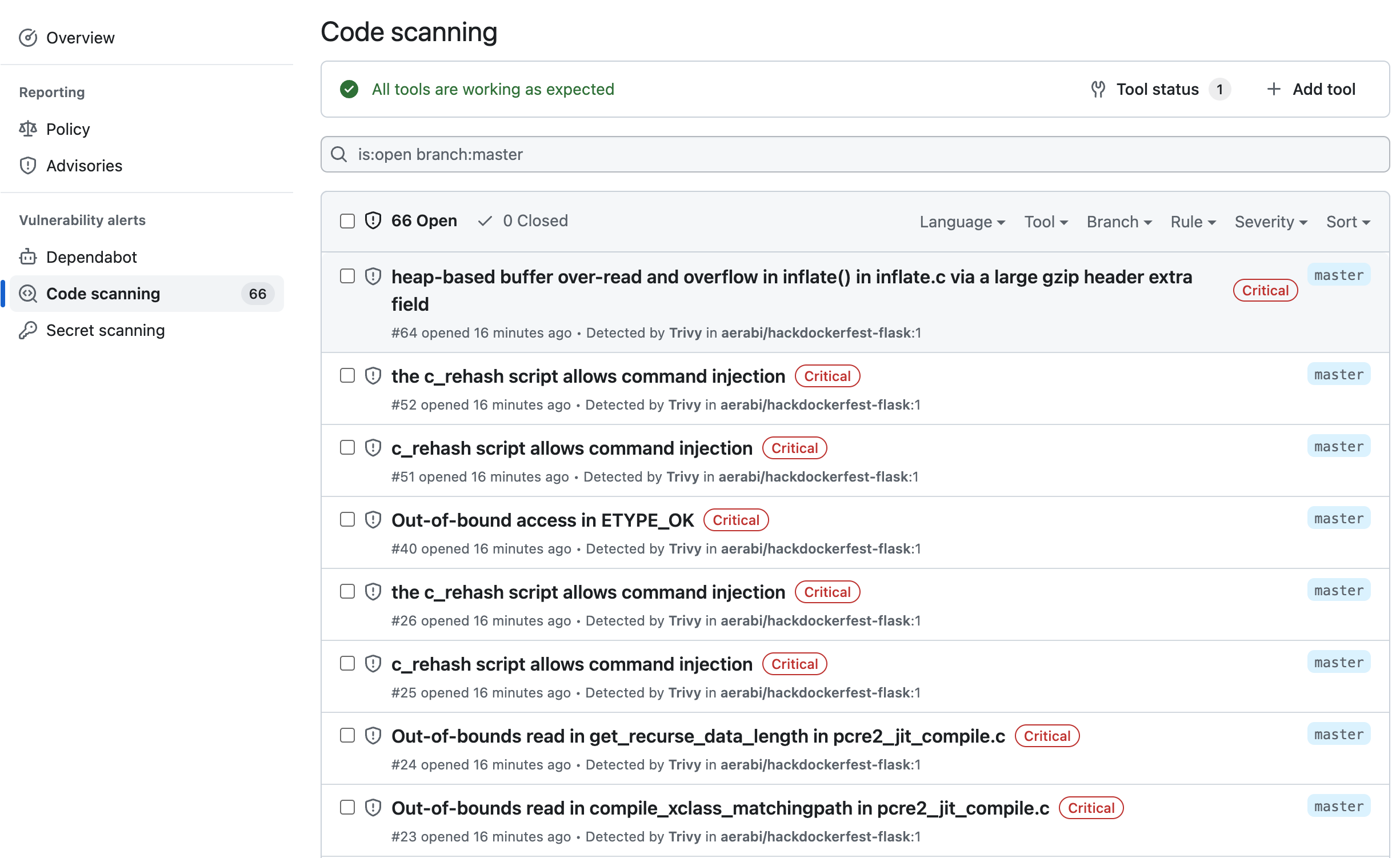
A few notes about the workflow:
- The workflow has two jobs. The first job builds the Docker image, and pushes it to the GitHub Container Registry. The second job uses Trivy to scan the image for known vulnerabilities, and uploads the results to the GitHub Security tab.
- The workflow uses the
docker/metadata-actionto extract the tags and labels of the Docker image. The tags and labels are used by Trivy to identify the image. This will ensure that the images stored in the GitHub Container Registry are not overwritten by the workflow and the results of the scan are uploaded to the correct image. - The workflow uses the
docker/build-push-actionto build the Docker image and push it to the GitHub Container Registry. - The workflow uses the
aquasecurity/trivy-actionto scan the Docker image for known vulnerabilities. The output format is set to SARIF, and the results are uploaded to the GitHub Security tab using thegithub/codeql-action.
Exercises
- Create a GitHub Actions workflow that uses Trivy to scan a Docker image for known vulnerabilities, and uploads the results to the GitHub Security tab. Add it to your project of choice.
- Generate SBOM for a Docker image using Trivy:
docker run --rm -it aquasec/trivy image --format spdx-json alpine:3.12 - Learn about different Trivy output formats:
table: Human-readable table format, default.json: JSON format.template: Go template format.spdx: SPDX format.spdx-json: SPDX JSON format.sarif: SARIF format.cyclonedx: CycloneDX format.github: GitHub Security Advisories format.cosign-vuln: Cosign vulnerability report format.